
When an employee joins a new company halfway through the year, the HR team usually focuses on the offer letter, payroll setup, statutory registrations and first salary payment.
But there is another important document that employers should not overlook: Borang TP3.
Form TP3 helps the new employer obtain information about an employee’s previous employment during the same calendar year. This information is used when calculating Potongan Cukai Bulanan (PCB), also known as Monthly Tax Deduction (MTD).
Without accurate previous-employment information, the new employer may calculate monthly tax deductions using incomplete year-to-date figures.
This guide explains what Borang TP3 is, who needs to complete it, how to fill in the 2026 form, which documents HR should collect and how to incorporate TP3 into a reliable onboarding process.
What Is Borang TP3 in Malaysia?
Borang TP3 is an LHDN form used to declare information from an employee’s previous employment within the current year for PCB calculation purposes.
It allows the new employer to take account of relevant accumulated remuneration, tax deductions and other applicable information from previous employers.
For example, an employee who joins a new company in October 2026 may have earned a salary, commission and bonus from another employer between January and September.
These amounts can affect the employee’s PCB calculation for the remaining months of 2026.
The official document is known as Borang PCB/TP3 (1/2026).
Employers can obtain the form and explanatory notes from the official LHDN website.
Official downloads:
- Borang TP3 2026 — English PDF
- Borang TP3 2026 — Bahasa Malaysia PDF
- TP3 2026 Explanatory Notes — English
Who Needs to Complete Borang TP3?
According to LHDN’s 2026 explanatory notes, employers must ensure new employees complete TP3 to obtain previous-employment information and accumulated deductions.
This is particularly relevant when an employee has worked for another employer earlier in the same calendar year.
| Employee situation | What HR should do |
|---|---|
| Employee changes jobs during 2026 | Obtain completed TP3 with current-year previous-employment information |
| Employee had two previous employers in 2026 | Obtain information for both employers and use an additional attachment where necessary |
| Employee is joining their first job | Obtain the appropriate TP3 declaration and record that there is no previous employment in the year |
| Employee joins in January 2026 after leaving a job in December 2025 | Do not carry previous-year remuneration into 2026 TP3 totals |
| Employee cannot provide complete previous-employment figures | Follow up for supporting records and document any unresolved information |
The important distinction is the calendar year, not simply whether the employee has worked before.
An employee may have ten years of working experience but no previous employment income in 2026.
Another employee may have worked for two companies during 2026 and therefore needs to disclose the relevant accumulated information from both.
Borang TP3 vs TP1 vs EA Form: What Is the Difference?
Employers sometimes confuse these documents because all three can contain information relevant to income tax.
However, they serve different purposes.
TP3 vs TP1 vs EA Form
Three different documents used for different employment tax purposes.
Borang TP3
PREVIOUS EMPLOYMENT
Declares previous employment remuneration, deductions and PCB within the current year.
When: During new employee onboarding.
Borang TP1
DEDUCTIONS & REBATES
Used for applicable individual deduction and rebate claims for PCB purposes.
When: When relevant claims are made for PCB calculation.
EA Form
ANNUAL REMUNERATION
Summarises annual remuneration and relevant employment information issued by an employer to its employee.
When: Annually, by the end of February of the following year.
Remember: TP3 reports current-year previous employment information; it is not a replacement for TP1 or the EA Form.
In simple terms, TP3 deals with previous employment during the current year, TP1 is used for applicable deduction and rebate claims for PCB purposes, and the EA Form summarises annual employment remuneration provided by an employer.
These documents should not be treated as interchangeable.
How to Fill in Borang TP3 2026
The 2026 TP3 form contains several sections covering previous employers, employee information, remuneration and relevant tax deductions.
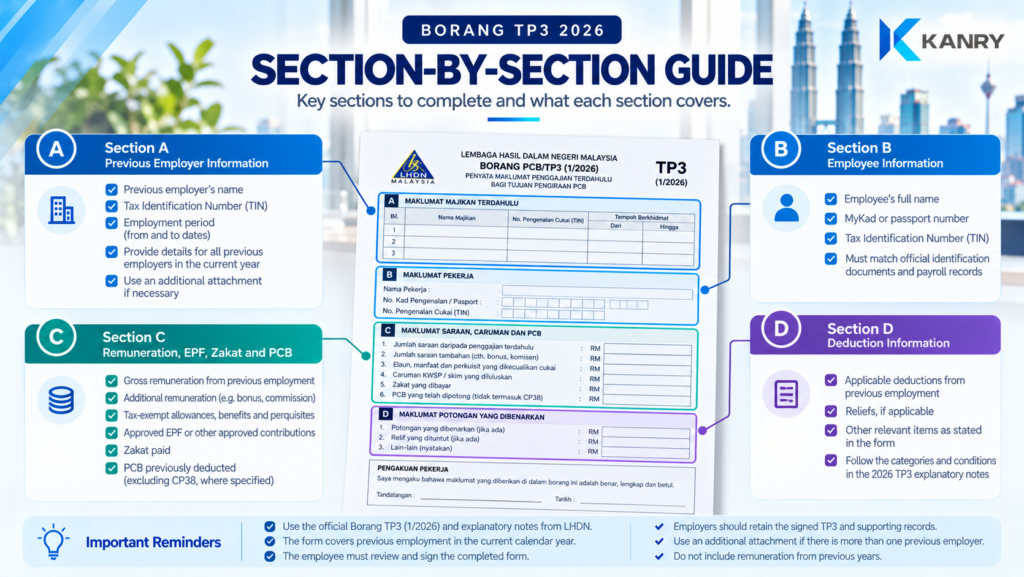
Section A: Previous Employer Information
The employee provides details of previous employers during the current year.
These include the previous employer’s name and Tax Identification Number (TIN).
Where there is more than one previous employer, the employee should provide the relevant details and use an additional attachment when required.
Section B: Employee Information
This section identifies the employee completing the form.
It includes the employee’s name, identity card or passport number, and TIN.
HR should verify that the information is consistent with the employee’s onboarding records.
Section C: Remuneration, EPF, Zakat and PCB
This is particularly important for payroll calculations.
The employee declares accumulated amounts from previous employment during the current year, including relevant categories such as:
- Gross remuneration and additional remuneration.
- Applicable tax-exempt allowances, benefits and perquisites.
- Approved EPF or other approved fund contributions.
- Zakat and other specified items.
- PCB previously deducted, excluding CP38 where the form specifies this distinction.
Employers should use the official form’s categories rather than entering every amount into a single salary field.
Section D: Deduction Information
Section D contains the applicable deduction information from previous employment during the current year.
The 2026 form and explanatory notes provide the detailed categories and conditions.
Employees should declare only amounts that qualify under the relevant tax rules and retain supporting documentation where required.
Declaration and Signature
The employee must review and sign the completed form.
The new employer should retain the signed TP3 and make it available to LHDN when requested during a PCB audit.
Important: Employers should use the current official 2026 form rather than relying on an older template, as the deduction fields and explanatory notes may change between years.
What Documents Should HR Request for Borang TP3?
Although TP3 is the formal declaration, supporting records can help employees complete it accurately.
Borang TP3 — New Hire Document Checklist
Check the information needed before processing the employee’s first payroll.
This is an internal onboarding aid. Checklist selections are not saved. Supporting documents depend on the employee’s circumstances.
The exact supporting information will depend on the employee’s circumstances.
For example, an employee who received a bonus before resigning may need to check their previous payslips or annual remuneration records to ensure that the amount is included correctly.
HR should collect only information necessary for the payroll process and protect employee tax and remuneration records from unauthorised access.
Practical Example: Employee Changes Jobs in October 2026
Consider an employee who joins a new company on 5 October 2026.
The employee previously worked for another Malaysian employer from January to September 2026.
Before processing the first payroll, HR requests Borang TP3 and the employee provides the following illustrative accumulated figures.
| Previous employment information | January–September 2026 |
|---|---|
| Gross remuneration | RM54,000 |
| Approved employee EPF contributions | RM5,940 |
| PCB already deducted | RM2,400 |
| Zakat paid | RM0 |
| Additional deductions and reliefs | Subject to the employee’s declaration |
These figures are examples only and are not a completed tax calculation.
PRACTICAL PAYROLL EXAMPLE
October 2026: New Employee TP3 Timeline
The employee starts work after being employed elsewhere from January to September.
The employee declares accumulated previous remuneration, EPF, PCB and other applicable information.
Payroll checks the relevant figures and applies them to the prescribed 2026 PCB calculation.
The employer generally remits October PCB by 15 November 2026, subject to applicable LHDN payment arrangements.
TP3 helps the new employer account for current-year previous employment when calculating PCB. It does not transfer tax payments between employers.
Why the previous figures matter
The new employer should not calculate the employee’s PCB as though the employee had earned no income earlier in 2026.
Instead, the payroll calculation should incorporate the applicable previous-employment figures in accordance with LHDN’s 2026 PCB calculation specification.
The final PCB amount depends on the employee’s complete tax circumstances, remuneration, allowable deductions, rebates and the prescribed calculation method.
It cannot be determined from the figures above alone.
How Borang TP3 Affects Monthly PCB Calculations
PCB is a mechanism for deducting income tax from employment remuneration through monthly payroll.
When an employee changes employers, the new payroll system needs accurate current-year information to calculate deductions appropriately.
For employees with previous employment during the same year, TP3 provides the relevant historical inputs.
What payroll should verify
Payroll should check that the employee’s current-year previous-employment information has been correctly reflected in the calculation.
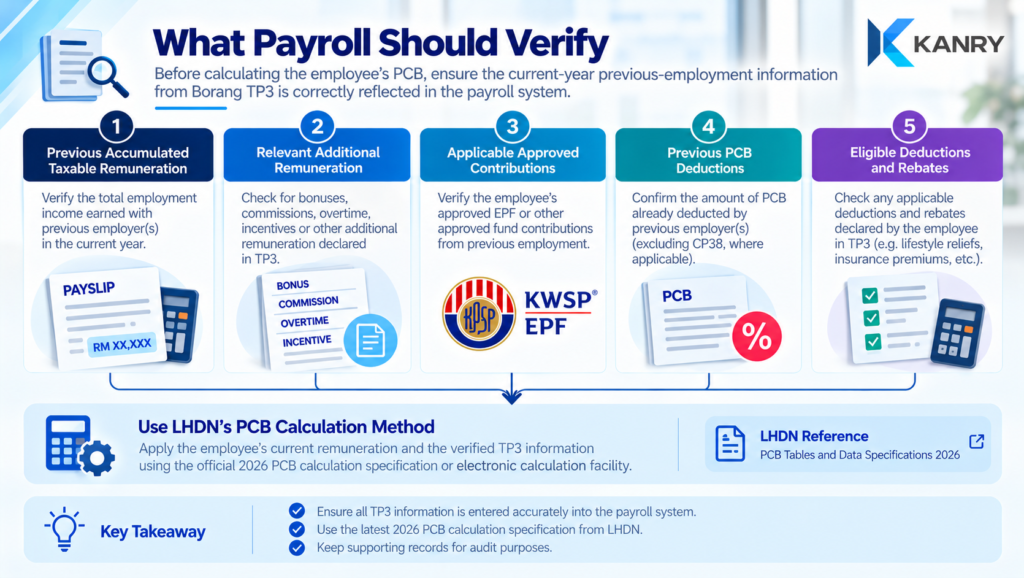
Employers should use the applicable LHDN PCB calculation specification or official electronic calculation facility.
For 2026, LHDN provides an updated computerised PCB calculation specification.
Official reference: LHDN — PCB Tables and Data Specifications.
When Should Employers Collect Borang TP3?
The best time to collect TP3 is during employee onboarding, before the first payroll calculation is finalised.
Unlike monthly PCB remittance, TP3 does not operate as a separate monthly payment submission.
It is a declaration that the employer must retain.
Recommended internal timeline
| Timing | Recommended HR or payroll action |
|---|---|
| Before start date | Inform the employee that TP3 is part of onboarding |
| First working day | Provide the current-year TP3 form and explanatory notes |
| Before first payroll cutoff | Obtain the completed, signed form |
| Payroll review | Validate relevant previous-employment figures |
| Before payroll approval | Confirm that the PCB calculation uses the appropriate information |
| After payroll processing | Securely retain TP3 and supporting records |
This internal timeline helps employers avoid discovering missing previous-employment information only after the employee’s first payslip has been issued.
What Happens If an Employee Does Not Submit TP3?
An incomplete or missing TP3 can create uncertainty in the payroll calculation.
The employer may not have the information needed to account for previous remuneration and tax deductions from earlier employment during the year.
Where information is missing, HR should:
- Explain why the form is required.
- Give the employee the current official TP3 and explanatory notes.
- Request the relevant previous-employment details.
- Document follow-up attempts and any unresolved discrepancies.
- Ask payroll to review the correct calculation treatment under LHDN rules.
Employers should not invent previous salary, EPF or PCB amounts to complete the form.
If an employee has genuinely had no previous employment during the current year, that should be accurately reflected in the declaration.
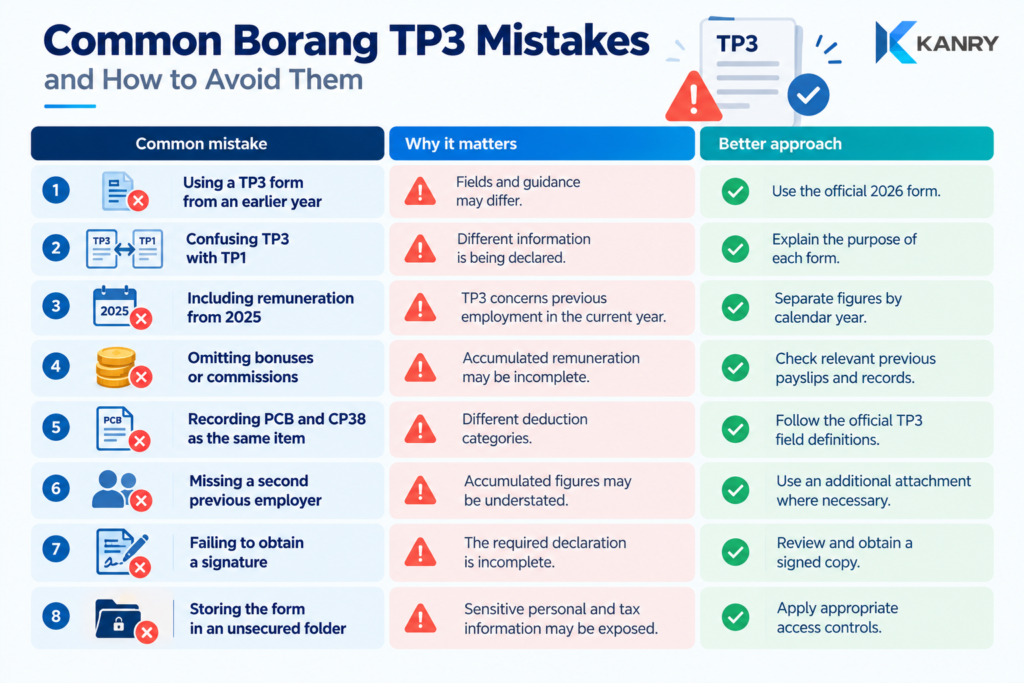
Common Borang TP3 Mistakes Employers Should Avoid
Who Is Responsible for Borang TP3 Compliance?
A reliable TP3 process should involve the employee, HR and payroll.
Borang TP3 Compliance — Who Does What?
Four parties have distinct responsibilities in collecting, reviewing and using TP3 information for payroll tax calculations.
👤 Employee
Provide accurate previous-employment information, complete Borang TP3 and sign the declaration.
👥 Human Resources
Coordinate TP3 collection, check that the form is complete, follow up on missing details and retain records securely.
🧮 Payroll
Review relevant TP3 figures, incorporate previous-employment information into the prescribed PCB calculation and check the results.
🛡 Management
Assign clear responsibilities, oversee payroll compliance controls and ensure unresolved declarations or discrepancies are escalated.
The employer remains responsible for fulfilling applicable monthly PCB calculation, deduction and remittance obligations, even when administrative tasks are delegated to HR, payroll personnel or external service providers.
Management should ensure that these responsibilities are assigned and that there is a process for resolving incomplete declarations.
The employer remains responsible for fulfilling its applicable PCB obligations, even where administrative work is delegated.
Frequently Asked Questions About Borang TP3 Malaysia 2026
Borang TP3 Malaysia 2026 — FAQs
Click each question to read the answer.
What is Borang TP3 used for?
TP3 declares information from previous employment during the current year, including relevant remuneration and deductions, for monthly PCB calculation.
Is Borang TP3 mandatory for new employees?
LHDN’s 2026 explanatory notes state that employers must ensure new employees complete TP3 to obtain previous-employment information and accumulated deductions.
Does an employee with no previous job in 2026 need to provide previous salary figures?
No previous-employment amounts should be invented. The employee should accurately indicate that there was no previous employment during the current year.
Should TP3 include salary earned in 2025?
No. The 2026 TP3 concerns previous employment during the current calendar year, not remuneration earned in 2025.
What if an employee had two previous employers?
The employee should declare the relevant information from both previous employers within the current year and provide an additional attachment where required.
Is TP3 the same as the EA Form?
No. TP3 provides current-year previous employment information for PCB purposes. The EA Form is an annual remuneration statement issued by an employer.
Must employers submit TP3 to LHDN every month?
No. Employers retain the completed and signed TP3 and furnish it to LHDN when requested during a PCB audit. This is separate from monthly PCB remittance.
Where can employers download TP3 2026?
Download the official form and explanatory notes from the LHDN website: PCB Tables and Data Specifications .
Refer to the official 2026 TP3 form and explanatory notes for employee-specific requirements.
How Kanry Search Supports Malaysian Employers
Employee onboarding is not complete when the offer letter is signed.
Employers also need accurate employee records, statutory registration details, appropriate tax declarations and reliable payroll administration.
For businesses hiring multiple employees each month, standardised onboarding processes can help prevent missing forms and payroll corrections.
Kanry Search supports Malaysian employers with recruitment, contract staffing, payroll administration and workforce-related HR services.
Whether your organisation is hiring permanent employees, expanding a contract workforce or improving onboarding controls, Kanry Search can support your workforce requirements.
Need Recruitment or Payroll Administration Support?
Contact Kanry Search to discuss recruitment, staffing and payroll administration support for your Malaysian operations.
Official References
- LHDN — Borang TP3 2026 (English)
- LHDN — Borang TP3 2026 (Bahasa Malaysia)
- LHDN — Explanatory Notes for Form TP3 2026
- LHDN — PCB Tables and Data Specifications
- LHDN — Employer Responsibilities
- LHDN — PCB Payment
Disclaimer: This article provides general information as of October 2026 and is not individual tax or legal advice. Employers should verify current requirements and employee-specific PCB calculations with LHDN or a qualified tax professional.